Showing posts with label Notes. Show all posts
Monday, February 23, 2015
documentaryaddict is for documentaries lover
Documentaryadict is for those who love to watch documentaries. Good for children and educations. Previously I used to search in google to look for some documentary and often stumbled upon something else. This website seem to simplify the need of a very good documentary.
http://documentaryaddict.com
Saturday, January 17, 2015
Launch Windows Admin Tools from the Command Line
You can access admin tools in Windows consoles instead of from the Start menu. But you can also open these console from the command line if you know their .msc filenames. This can be especially useful if you log on to your admin workstation using a limited privilege account and use Runas command to perform admin tasks.
First we need to execute windows cmd, this is the shorcuts:
For normal prompt, follow these steps:
------------------------------------------------------------------------
WinKey+R
Input "cmd".
Enter
.
For elevated (administrator) prompt, follow these steps:
WinKey (Start Menu opens on the left-bottom corner)
Input "cmd".
Ctrl+Shift+Enter
------------------------------------------------------------------------
For reference, here's a list of admin tools with their associated .msc files. You can print this out and tape it on the wall beside your workstation until you memorize the ones you use most commonly.
AD Domains and Trusts
domain.msc
Active Directory Management
admgmt.msc
AD Sites and Serrvices
dssite.msc
AD Users and COmputers
dsa.msc
ADSI Edit
adsiedit.msc
Authorization manager
azman.msc
Certification Authority Management
certsrv.msc
Certificate Templates
certtmpl.msc
Cluster Administrator
cluadmin.exe
Computer Management
compmgmt.msc
Component Services
comexp.msc
Configure Your Server
cys.exe
Device Manager
devmgmt.msc
DHCP Managment
dhcpmgmt.msc
Disk Defragmenter
dfrg.msc
Disk Manager
diskmgmt.msc
Distributed File System
dfsgui.msc
DNS Managment
dnsmgmt.msc
Event Viewer
eventvwr.msc
Indexing Service Management
ciadv.msc
IP Address Manage
ipaddrmgmt.msc
Licensing Manager
llsmgr.exe
Local Certificates Management
certmgr.msc
Local Group Policy Editor
gpedit.msc
Local Security Settings Manager
secpol.msc
Local Users and Groups Manager
lusrmgr.msc
Network Load balancing
nlbmgr.exe
Performance Montior
perfmon.msc
PKI Viewer
pkiview.msc
Public Key Managment
pkmgmt.msc
QoS Control Management
acssnap.msc
Remote Desktops
tsmmc.msc
Remote Storage Administration
rsadmin.msc
Removable Storage
ntmsmgr.msc
Removalbe Storage Operator Requests
ntmsoprq.msc
Routing and Remote Access Manager
rrasmgmt.msc
Resultant Set of Policy
rsop.msc
Schema management
schmmgmt.msc
Services Management
services.msc
Shared Folders
fsmgmt.msc
SID Security Migration
sidwalk.msc
Telephony Management
tapimgmt.msc
Terminal Server Configuration
tscc.msc
Terminal Server Licensing
licmgr.exe
Terminal Server Manager
tsadmin.exe
UDDI Services Managment
uddi.msc
Windows Mangement Instumentation
wmimgmt.msc
WINS Server manager
winsmgmt.msc
First we need to execute windows cmd, this is the shorcuts:
For normal prompt, follow these steps:
------------------------------------------------------------------------
WinKey+R
Input "cmd".
Enter
.
For elevated (administrator) prompt, follow these steps:
WinKey (Start Menu opens on the left-bottom corner)
Input "cmd".
Ctrl+Shift+Enter
------------------------------------------------------------------------
For reference, here's a list of admin tools with their associated .msc files. You can print this out and tape it on the wall beside your workstation until you memorize the ones you use most commonly.
AD Domains and Trusts
domain.msc
Active Directory Management
admgmt.msc
AD Sites and Serrvices
dssite.msc
AD Users and COmputers
dsa.msc
ADSI Edit
adsiedit.msc
Authorization manager
azman.msc
Certification Authority Management
certsrv.msc
Certificate Templates
certtmpl.msc
Cluster Administrator
cluadmin.exe
Computer Management
compmgmt.msc
Component Services
comexp.msc
Configure Your Server
cys.exe
Device Manager
devmgmt.msc
DHCP Managment
dhcpmgmt.msc
Disk Defragmenter
dfrg.msc
Disk Manager
diskmgmt.msc
Distributed File System
dfsgui.msc
DNS Managment
dnsmgmt.msc
Event Viewer
eventvwr.msc
Indexing Service Management
ciadv.msc
IP Address Manage
ipaddrmgmt.msc
Licensing Manager
llsmgr.exe
Local Certificates Management
certmgr.msc
Local Group Policy Editor
gpedit.msc
Local Security Settings Manager
secpol.msc
Local Users and Groups Manager
lusrmgr.msc
Network Load balancing
nlbmgr.exe
Performance Montior
perfmon.msc
PKI Viewer
pkiview.msc
Public Key Managment
pkmgmt.msc
QoS Control Management
acssnap.msc
Remote Desktops
tsmmc.msc
Remote Storage Administration
rsadmin.msc
Removable Storage
ntmsmgr.msc
Removalbe Storage Operator Requests
ntmsoprq.msc
Routing and Remote Access Manager
rrasmgmt.msc
Resultant Set of Policy
rsop.msc
Schema management
schmmgmt.msc
Services Management
services.msc
Shared Folders
fsmgmt.msc
SID Security Migration
sidwalk.msc
Telephony Management
tapimgmt.msc
Terminal Server Configuration
tscc.msc
Terminal Server Licensing
licmgr.exe
Terminal Server Manager
tsadmin.exe
UDDI Services Managment
uddi.msc
Windows Mangement Instumentation
wmimgmt.msc
WINS Server manager
winsmgmt.msc
Tutorial Enable USB Port through Regedit in Windows if it is blocked
1. Click Start, and then click Run.
2. In the Open box, type regedit, and then click OK.
3. Locate, and then click the following registry key:
HKEY_LOCAL_MACHINE\SYSTEM\CurrentControlSet\Services\UsbStor
4. In the right pane, double-click "Start".
5. In the Value data box, type "3" (without quotes), click Hexadecimal (if it is not already selected), and then click OK. Note :- if 3 is entered it will open the port and if 4 is entered it will close the port.
6. Quit Registry Editor.
Thursday, December 25, 2014
My favourite MOOC websites to gain extra knowledges | You guys should try it out
There are countless websites out there that are geared to make you more brilliant for free. Here are top websites that makes you smarter.
1. Udemy
Udemy is the world's largest destination for online courses. You can discover a lot of online course on Udemy.com and start learning a new skill today. All of the courses offers a Statement of Accomplishment cerftificate. A great deal to add in your resume.
2. Coursera
Coursera is a not for-profit educational technology company founded by computer science professors Andrew Ng and Daphne Koller from Stanford University that offers massive open online courses.
Some of the courses offer a free Statement of Accomplishment certificate. Start your courses today and learn new skills.
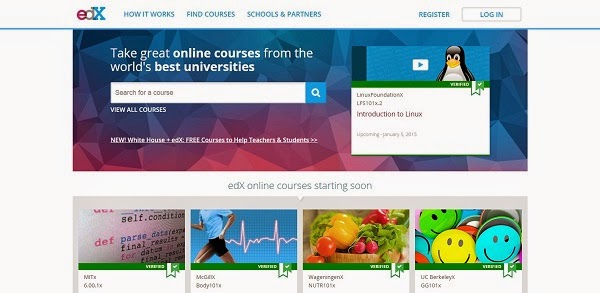
3. edX
EdX is a not-for-profit joint venture between Harvard University and the Massachusetts Institute of Technology to offer online versions of their classes and those of other universities.
EdX offers interactive online classes and MOOCs (massive open online course) from the world’s best universities, colleges and organizations. Online courses from MITx, HarvardX, BerkeleyX, UTx and many other universities. Topics include biology, business, chemistry, computer science, economics, finance, electronics, engineering, pabulum and alimentation, history, humanities, law, literature, math, medicine, music, philosophy, physics, science, statistics and more.
EdX was engendered for students and institutions that seek to transform themselves through cutting-edge technologies, innovative pedagogy, and rigorous courses.
Through our institutional partners, the xConsortium, along with other leading ecumenical members, we present the best of higher inculcation online, offering opportunity to anyone who wants to achieve, thrive, and grow. You also can grab a free Statement of Accomplishment certificate upon completion of the courses.
4. Stanford Online
Stanford Online offers a variety of professional education opportunities in conjunction with many of the University’s schools and departments. We also offer an array of free online courses taught by Stanford faculty to lifelong learners worldwide.
A lot of the courses offered is self paced mode. It is great deal if you are busy person that cannot keep up with a deadline. You can complete it at any time. Yes, you also given a free Statement of Accomplishment certificate upon completion of the courses. Start learning today.
5. Canvas
Canvas Network offers open, online courses taught by educators everywhere. It provides a place and platform where teachers, students, and institutions worldwide can connect and chart their own course for personal growth, professional development, and academic inquiry. Canvas Network is developed and supported by Instructure, a technology company that partners with educators, institutions, and technologists to break down barriers to learning. They also given free Statement of Completion certificate upon completion of the courses.
6. MIT OpenCourseWare
MIT OpenCourseWare (MIT OCW) is an initiative of the Massachusetts Institute of Technology (MIT) to put all of the educational materials from its undergraduate- and graduate-level courses online, partly free and openly available to anyone, anywhere. MIT OpenCourseWare is a large-scale, web-based publication of MIT course materials.
It makes the materials utilized in the edification of virtually all of MIT’s subjects available on the Web, free of charge. With more than 2,200 courses available, OCW is distributing on the promise of open sharing of erudition.
“The idea is simple: to publish all of our course materials online and make them widely available to everyone.” – Dick K.P. Yue, Professor, MIT School of Engineering
Through OCW, educators amend courses and curricula, making their schools more efficacious; students find adscititious resources to avail them prosper; and independent learners enrich their lives and utilize the content to tackle some of our world’s most arduous challenges, including sustainable development, climate change, and cancer eradication.
This MOOCs did not offers any certificate of completion and you can start learning without the need of registration.
7. Code Academy
Codecademy is an inculcation company. But not one in the way you might cerebrate. They’re committed to building the best learning experience inside and out, making Codecademy the best place for our team to learn, edify, and engender the online learning experience of the future.
Edification is old. The current public school system in the US dates back to the 19th century and wasn’t designed to scale the way it has. Lots of companies are working to “disrupt” edification by transmuting the way things work in the classroom and by bringing the classroom online.
This MOOCs also did not give any certificate upon completion of the courses.
1. Udemy
![]() |
| Udemy |
Udemy is the world's largest destination for online courses. You can discover a lot of online course on Udemy.com and start learning a new skill today. All of the courses offers a Statement of Accomplishment cerftificate. A great deal to add in your resume.
2. Coursera
![]() |
| Coursera |
Coursera is a not for-profit educational technology company founded by computer science professors Andrew Ng and Daphne Koller from Stanford University that offers massive open online courses.
Some of the courses offer a free Statement of Accomplishment certificate. Start your courses today and learn new skills.
3. edX
![]() |
| eDX |
EdX is a not-for-profit joint venture between Harvard University and the Massachusetts Institute of Technology to offer online versions of their classes and those of other universities.
EdX offers interactive online classes and MOOCs (massive open online course) from the world’s best universities, colleges and organizations. Online courses from MITx, HarvardX, BerkeleyX, UTx and many other universities. Topics include biology, business, chemistry, computer science, economics, finance, electronics, engineering, pabulum and alimentation, history, humanities, law, literature, math, medicine, music, philosophy, physics, science, statistics and more.
EdX was engendered for students and institutions that seek to transform themselves through cutting-edge technologies, innovative pedagogy, and rigorous courses.
Through our institutional partners, the xConsortium, along with other leading ecumenical members, we present the best of higher inculcation online, offering opportunity to anyone who wants to achieve, thrive, and grow. You also can grab a free Statement of Accomplishment certificate upon completion of the courses.
4. Stanford Online
![]() |
| Stanford Online |
Stanford Online offers a variety of professional education opportunities in conjunction with many of the University’s schools and departments. We also offer an array of free online courses taught by Stanford faculty to lifelong learners worldwide.
A lot of the courses offered is self paced mode. It is great deal if you are busy person that cannot keep up with a deadline. You can complete it at any time. Yes, you also given a free Statement of Accomplishment certificate upon completion of the courses. Start learning today.
5. Canvas
![]() |
| Canvas |
Canvas Network offers open, online courses taught by educators everywhere. It provides a place and platform where teachers, students, and institutions worldwide can connect and chart their own course for personal growth, professional development, and academic inquiry. Canvas Network is developed and supported by Instructure, a technology company that partners with educators, institutions, and technologists to break down barriers to learning. They also given free Statement of Completion certificate upon completion of the courses.
6. MIT OpenCourseWare
![]() |
| MIT OpenCourseWare |
MIT OpenCourseWare (MIT OCW) is an initiative of the Massachusetts Institute of Technology (MIT) to put all of the educational materials from its undergraduate- and graduate-level courses online, partly free and openly available to anyone, anywhere. MIT OpenCourseWare is a large-scale, web-based publication of MIT course materials.
It makes the materials utilized in the edification of virtually all of MIT’s subjects available on the Web, free of charge. With more than 2,200 courses available, OCW is distributing on the promise of open sharing of erudition.
“The idea is simple: to publish all of our course materials online and make them widely available to everyone.” – Dick K.P. Yue, Professor, MIT School of Engineering
Through OCW, educators amend courses and curricula, making their schools more efficacious; students find adscititious resources to avail them prosper; and independent learners enrich their lives and utilize the content to tackle some of our world’s most arduous challenges, including sustainable development, climate change, and cancer eradication.
This MOOCs did not offers any certificate of completion and you can start learning without the need of registration.
7. Code Academy
![]() |
| Code Acedemy |
Codecademy is an inculcation company. But not one in the way you might cerebrate. They’re committed to building the best learning experience inside and out, making Codecademy the best place for our team to learn, edify, and engender the online learning experience of the future.
Edification is old. The current public school system in the US dates back to the 19th century and wasn’t designed to scale the way it has. Lots of companies are working to “disrupt” edification by transmuting the way things work in the classroom and by bringing the classroom online.
This MOOCs also did not give any certificate upon completion of the courses.
Monday, December 15, 2014
Tips Install Java on Ubuntu using Apt-Get command
1)Installing default JRE/JDK
This is the recommended and easiest option. This will install OpenJDK 6 on Ubuntu 12.04 and earlier and on 12.10+ it will install OpenJDK 7.
Installing Java with apt-get is easy. First, update the package index:
Then, check if Java is not already installed:
If it returns "The program java can be found in the following packages", Java hasn't been installed yet, so execute the following command:
This will install the Java Runtime Environment (JRE). If you instead need the Java Development Kit (JDK), which is usually needed to compile Java applications (for example Apache Ant, Apache Maven, Eclipse and IntelliJ IDEA execute the following command:
That is everything that is needed to install Java.
2)Setting the "JAVA_HOME" environment variable
To set the JAVA_HOME environment variable, which is needed for some programs, first find out the path of your Java installation:
usually the path should be in /usr/lib/jvm/
Copy the path from your preferred installation and then edit the file /etc/environment:
In this file, add the following line (replacing YOUR_PATH by the just copied path):
JAVA_HOME="YOUR_PATH"
That should be enough to set the environment variable. Now reload this file:
source /etc/environment
Test it by executing:
This is the recommended and easiest option. This will install OpenJDK 6 on Ubuntu 12.04 and earlier and on 12.10+ it will install OpenJDK 7.
Installing Java with apt-get is easy. First, update the package index:
sudo apt-get update
Then, check if Java is not already installed:
java -version
If it returns "The program java can be found in the following packages", Java hasn't been installed yet, so execute the following command:
sudo apt-get install default-jre
This will install the Java Runtime Environment (JRE). If you instead need the Java Development Kit (JDK), which is usually needed to compile Java applications (for example Apache Ant, Apache Maven, Eclipse and IntelliJ IDEA execute the following command:
sudo apt-get install default-jdk
That is everything that is needed to install Java.
2)Setting the "JAVA_HOME" environment variable
To set the JAVA_HOME environment variable, which is needed for some programs, first find out the path of your Java installation:
sudo update-alternatives --config java
usually the path should be in /usr/lib/jvm/
Copy the path from your preferred installation and then edit the file /etc/environment:
sudo nano /etc/environment
In this file, add the following line (replacing YOUR_PATH by the just copied path):
JAVA_HOME="YOUR_PATH"
That should be enough to set the environment variable. Now reload this file:
source /etc/environment
Test it by executing:
echo $JAVA_HOME
Friday, November 28, 2014
Console2: Awesome Windows Command Prompt replacement
Console2 is opensource, meaning that as long any developer around the world can work on it and it will never dead for a long time.
Download Console2 at http://sourceforge.net/projects/console/files/ and put it in c:\dev\utils and configure that location in the PATH.
Now I had the files extracted as in my PATH C:\dev\utils\Console2. A lot of features in console2 such as tabs, copy on select etc.
Configure it as you like or you all can follow the references setting in the link below.
Reference: http://www.hanselman.com/blog/Console2ABetterWindowsCommandPrompt.aspx
Download Console2 at http://sourceforge.net/projects/console/files/ and put it in c:\dev\utils and configure that location in the PATH.
Now I had the files extracted as in my PATH C:\dev\utils\Console2. A lot of features in console2 such as tabs, copy on select etc.
Configure it as you like or you all can follow the references setting in the link below.
Reference: http://www.hanselman.com/blog/Console2ABetterWindowsCommandPrompt.aspx
Thursday, November 27, 2014
Error Id-734: The PPP Link Control Protocol Was Terminated"
This is a problem might happen to 3G broadband user.
This is the solutions.
Click Start, control panel, Network & Sharing Center
Change adapter settings, select 3G modem
Right-click, click Properties.
Networking tab, and then click Settings.
Click to clear the Negotiate multi-link for single link connections check box (if it is selected).
OK,OK,OK...
Try dial 3G again
Reference: http://support.microsoft.com/KB/318718
This is a problem might happen to 3G broadband user.
This is the solutions.
Click Start, control panel, Network & Sharing Center
Change adapter settings, select 3G modem
Right-click, click Properties.
Networking tab, and then click Settings.
Click to clear the Negotiate multi-link for single link connections check box (if it is selected).
OK,OK,OK...
Try dial 3G again
Reference: http://support.microsoft.com/KB/318718
Monday, November 17, 2014
High CPU activity problem: Stop and disable AVGIDSagent service
AVG user mostly will experience CPU High activity. Computer become slow and hardly to use. This is because of AVGIDSagent service using a lot of the computer resources. Blame AVG for that.
To solve that problem, follow this guide:
1) At tray, Temporary disabled AVG protection.
2) Open Windows Services
3) Open AVGIDSagent service. Stopped the service by changed its status from “Automatic” to “Disabled”
4) Enable AVG protection again.
Everythng is back on high speed as normal.
Reference:
http://www.thefreewindows.com/16279/stop-disable-avgidsagent-service-reduce-cpu-activity/
Wednesday, November 12, 2014
Fix samsung error: E:failed to mount / efs (Invalid argument)
I got a Samsung Galaxy Note 8 GT-N5100 with error E:failed to mount / efs (Invalid argument) whenever I run a wipe cache or wipe factory in recovery. I did stuck in a samsung logo. This looping is a common nightmare for a Samsung devices.
There is a fix for this error. Follow this steps:
Ready a ROM(I use Pac Man ROM) in your microSD and insert into device.
1) Download and flash official firmware for your phone using Odin.
2) Root and flash custom recovery(I use TWRP) using Odin
3) Install ADB on your computer(Usually by installing Samsung USB driver)
4) Boot into recovery mode(hold up+power button)
5) Connect phone to PC via USB Cable
6) In recovery mode Choose “mount and storage > mount /system”(In TWRP, just tick the 'system')
7) At PC, open ADB command window and type :
DON'T REBOOT YET, Now /efs is mounted don't unmount it.
Do a factory reset
Install your new rom, It should install without any errors
Boot your phone, After it boots your signal notification most likely will be gray and internet or calls may not work. To fix just install gapps and it will be fixed.
If you don't have phone, try this:
Go back into recovery and get adb access. Then run this command:
This command will create a generic EFS files on your device.
Now normally your device will reboot and it should pass Samsung logo.
Your device might display a screen with a yellow text (FactoryMode)
If your device display a annoying transparency black background which contains some info about your device (PDA, Phone, CSC, H/W, Camera, …) in yellow text … and lock screen is not working, mean that your device is in factory mode.
“Factory Mode” is enabled if the EFS partition is corrupted because of installing custom ROMs, bad Mods or downgrading your current system version or after you succeeded in fixing the EFS partition.
Follow this step to exit FactoryMode:
1) Install root browser
2) Go to Local > / Device > efs > FactoryApp and open factorymode as text in “ES Note Editor”
3) Change it from OFF to ON and save it
4) Open keystr as text in “ES Note Editor”, change it from OFF to ON and save it
5) Reboot
Alternative solution by using Terminal Emulator.
1) Install “Terminal Emulator“
2) Type :
su
rm /efs/FactoryApp/keystr
rm /efs/FactoryApp/factorymode
echo -n ON >> /efs/FactoryApp/keystr
echo -n ON >> /efs/FactoryApp/factorymode
chown 1000.1000 /efs/FactoryApp/keystr
chown 1000.1000 /efs/FactoryApp/factorymode
chmod 0744 /efs/FactoryApp/keystr
chmod 0744 /efs/FactoryApp/factorymode
reboot
References:
http://forum.xda-developers.com/showthread.php?t=2430202
http://zidroid.com/how-to-fix-failed-to-mount-efs-for-galaxy-s3-gt-i9300/
http://zidroid.com/how-to-exit-factory-mode-for-samsung-galaxy-devices/
http://www.digitalreborn.com/fix-samsung-galaxy-unable-mount-efs/
There is a fix for this error. Follow this steps:
Ready a ROM(I use Pac Man ROM) in your microSD and insert into device.
1) Download and flash official firmware for your phone using Odin.
2) Root and flash custom recovery(I use TWRP) using Odin
3) Install ADB on your computer(Usually by installing Samsung USB driver)
4) Boot into recovery mode(hold up+power button)
5) Connect phone to PC via USB Cable
6) In recovery mode Choose “mount and storage > mount /system”(In TWRP, just tick the 'system')
7) At PC, open ADB command window and type :
adb shell
su
dd if=/dev/block/mmcblk0p3 of=/sdcard/efs.img
mke2fs /dev/block/mmcblk0p3
mkdir /efs
mount -t ext4 /dev/block/mmcblk0p3 /efs
DON'T REBOOT YET, Now /efs is mounted don't unmount it.
Do a factory reset
Install your new rom, It should install without any errors
Boot your phone, After it boots your signal notification most likely will be gray and internet or calls may not work. To fix just install gapps and it will be fixed.
If you don't have phone, try this:
Go back into recovery and get adb access. Then run this command:
sumke2fs /dev/block/mmcblk0p3mkdir /efsmount -t ext4 /dev/block/mmcblk0p3 /efsdd if=/sdcard/efs.img of=/dev/block/mmcblk0p3 bs=4096reboot
This command will create a generic EFS files on your device.
Now normally your device will reboot and it should pass Samsung logo.
Your device might display a screen with a yellow text (FactoryMode)
If your device display a annoying transparency black background which contains some info about your device (PDA, Phone, CSC, H/W, Camera, …) in yellow text … and lock screen is not working, mean that your device is in factory mode.
“Factory Mode” is enabled if the EFS partition is corrupted because of installing custom ROMs, bad Mods or downgrading your current system version or after you succeeded in fixing the EFS partition.
Follow this step to exit FactoryMode:
1) Install root browser
2) Go to Local > / Device > efs > FactoryApp and open factorymode as text in “ES Note Editor”
3) Change it from OFF to ON and save it
4) Open keystr as text in “ES Note Editor”, change it from OFF to ON and save it
5) Reboot
Alternative solution by using Terminal Emulator.
1) Install “Terminal Emulator“
2) Type :
su
rm /efs/FactoryApp/keystr
rm /efs/FactoryApp/factorymode
echo -n ON >> /efs/FactoryApp/keystr
echo -n ON >> /efs/FactoryApp/factorymode
chown 1000.1000 /efs/FactoryApp/keystr
chown 1000.1000 /efs/FactoryApp/factorymode
chmod 0744 /efs/FactoryApp/keystr
chmod 0744 /efs/FactoryApp/factorymode
reboot
References:
http://forum.xda-developers.com/showthread.php?t=2430202
http://zidroid.com/how-to-fix-failed-to-mount-efs-for-galaxy-s3-gt-i9300/
http://zidroid.com/how-to-exit-factory-mode-for-samsung-galaxy-devices/
http://www.digitalreborn.com/fix-samsung-galaxy-unable-mount-efs/
Saturday, October 25, 2014
Finally! I manage to upgrade my current Ubuntu to latest Ubuntu 14.10
Very frustrated at first...finally manage to do it correctly. This is the step I do.
1. PREPARATION
sudo apt-get clean
or,
sudo apt-get autoclean
sudo apt-get -f install
sudo dpkg --configure -a
sudo apt-get -f install
If the output is:
0 upgraded, 0 newly installed, 0 to remove and 1 not upgraded.
That means it failed.
Next solution is to run:
sudo apt-get -u dist-upgrade
sudo apt-get -o Debug::pkgProblemResolver=yes dist-upgrade
All ok if output:
0 upgraded, 0 newly installed, 0 to remove and 0 not upgraded.
1. UPGRADE/INSTALLATION
sudo apt-get update && sudo apt-get dist-upgrade
sudo do-release-upgrade
References:
[1] http://askubuntu.com/questions/140246/how-do-i-resolve-unmet-dependencies-after-adding-a-ppa
[2] http://www.unixmen.com/upgrade-ubuntu-14-04-trusty-ubuntu-14-10-utopic/
Saturday, October 18, 2014
Trust is not an option, you had to research the Truth to Trust
Inspire from Antitrust film. There is a lot of insspiring quotes that inspire me such as
"Human knowledge belongs to the world"
"Truth can be dangerous…Trust can be deadly"
"The answer's not in the box, it's in the band."
well, from me... "Trust is not an option, you had to research the Truth to Trust"
Assalamualaikum and enjoy my articles.
~cygnosis~
"Human knowledge belongs to the world"
"Truth can be dangerous…Trust can be deadly"
"The answer's not in the box, it's in the band."
well, from me... "Trust is not an option, you had to research the Truth to Trust"
Assalamualaikum and enjoy my articles.
~cygnosis~
Subscribe to:
Posts (Atom)