Showing posts with label Applications. Show all posts
Thursday, June 15, 2017
NangAntapTu versi 1.0.1 released(Android & iOS) - Baca Komik HK Percuma
NangAntapTu - Aplikasi percuma untuk baca komik hong kong. Install NangAntapTu sekarang. Applikasi percuma Android untuk baca koleksi komik hong kong seperti Juara Wira, Jengking Merah, Juara-Juara Kembar, Pendekar Laut, Wira Tunggal dan sebagainya.
Ada di app store personal saya:
http://goo.gl/WYr40w
NangAntapTu versi 1.0.1
-Bug fix & improvement
-Tukar Button (Baca) top left, supaya tak keliru lagi
-versi iOS
Tuesday, September 6, 2016
NangAntapTu v0.1.6 released -free-
===============================
NEW RELEASE: NangAntapTu v0.1.6
===============================
http://www.amazon.com/cygnosis-NangAntapTu/dp/B016U0K6Z2/
or grab it from my personal mobile app store :
http://goo.gl/WYr40w
or you can scan this QR Code to easily access mobile apps store from your smartphone:
Changelog:
-Add unlock code feature mode
-Add share to social network function
-Sort Title by name
-Add FB Page support
-Complete Juara Wira
-Update images
-Update Library
Screenshots:
Komik terbaru Pendekar Laut The Beginning dan Wira Kembar, sambungan kisah Juara-Juara Kembar saya dah masukkan. Perlukan unlock code untuk unlock komik-komik WIP yang lain, sila request daripada saya. Sebahagian hasil terjemahan korang boleh tengok kat screenshots ni. Saya release hanya dalam app NangAntapTu. Layan.
Thursday, December 3, 2015
NangAntapTu v0.1.3 released -free-
===============================
NEW RELEASE: NangAntapTu v0.1.3
===============================
http://www.amazon.com/cygnosis-NangAntapTu/dp/B016U0K6Z2/
or grab it from my personal mobile app store :
http://goo.gl/WYr40w
or you can scan this QR Code to easily access mobile apps store from your smartphone:
Changelog:
-fresh new interface
-easy navigation
-improve performance
Screenshots:
Jengking Merah Buku 13 Episod 51-54 saya tengah translate. Sebahagian hasil terjemahan korang boleh tengok kat screenshots ni. Saya release hanya dalam app NangAntapTu. Layan.
Monday, June 15, 2015
NangAntap Baca Komik 1.7.0 released on Amazon App Store, Opera Mobile Store
Descriptions
Changelog:
-Complete Jengking Merah
-Remove EULA
-Improve performance
Simple Steps:
NangAntap v1.7.0 is ready:
1) Install Amazon App Store:
https://amznadsi-a.akamaihd.net/public/AmazonApps-release.apk
2) Install app:
http://www.amazon.com/gp/mas/dl/android?p=com.cygnosis729.NangAntap
or search in Amazon App Store keyword NangAntap
Leave comments. Thank you.
All available alternative stores as per below:
Thursday, March 19, 2015
NangAntap Baca Komik 1.5.0 released on Amazon App Store, Opera Mobile Store
Descriptions
Changelog:
Expand Library.
Update the database.
Bug fix and performance improvement.
Simple Steps:
NangAntap v1.5.0 is ready:
1) Install Amazon App Store:
https://amznadsi-a.akamaihd.net/public/AmazonApps-release.apk
2) Install app:
http://www.amazon.com/gp/mas/dl/android?p=com.cygnosis729.NangAntap
or search in Amazon App Store keyword NangAntap
Leave comments. Thank you.
All available alternative stores as per below:
Sunday, March 8, 2015
NangAntap Baca Komik 1.4.0 released on Amazon App Store, Opera Mobile Store, SlideME and many more
NangAntap Baca Komik v1.4.0
Short description:
NangAntap Baca Komik help Komik HK fans to facilitate read online. Imagine the fun you have long ago enjoying your komik. NangAntap Baca Komik introduced a new way to appreciate the collection of all your favorite Komik HK in each gadget. With this you can read the komik-komik pahlawan and a flashback to the days of strange wisdom such as Tinju Ketenangan Dan Ketenteraman Abadi. With this you can self read your favorite stories anywhere.
Long description:
NangAntap Baca Komik help Komik HK fans to facilitate read online. Imagine the fun you have long ago enjoying your komik. NangAntap Baca Komik introduced a new way to appreciate the collection of all your favorite Komik HK in each gadget. With this you can read the komik-komik pahlawan and a flashback to the days of strange wisdom such as Tinju Ketenangan Dan Ketenteraman Abadi. With this you can self read your favorite stories anywhere. Interaction is plain and simple by scrolling up and down in the selection menu to choose your favourites. Swipe from left to right to read the story. The contents is updated continuously and will be notified in the start news. Had fun reading Komik HK Juara Wira, Pendekar Laut, Juara-Juara Kembar, Juara Jalanan and many more on mobile phone and Tablet. Thank you! Credits: This application use some useful open source plugins. Thanks to androidactionbarlibrary, universal-image-loader and photoview.
Product feature bullets:
• Read Komik HK collection in bahasa melayu online.
• Discover the stories of your favorite hero.
• Can be accessed anywhere.
• Simple and light reading application and airy.
• Pull to resfresh the Start news.
• Swipe left and right while in the reading mode, pinch to zoom and double tap to zoom
• Social Network sharing features to share your reading status with your friends.
• Update the database to include more libraries
• Enhance graphics and menu interfaces, performance and fix bugs.
• Support partial offline data to simplify the user experience. --Experiment--.
Simple Steps:
NangAntap v1.4.0 is ready:
1) Install Amazon App Store:
https://amznadsi-a.akamaihd.net/public/AmazonApps-release.apk
2) Install app:
http://www.amazon.com/gp/mas/dl/android?p=com.cygnosis729.NangAntap
Leave comments. Thank you.
All available alternative stores as per below:
NangAntap Baca Komik V1.4.0
Thursday, February 19, 2015
NangAntap Baca Komik First Release at Amazon App Store
Description:
NangAntap Baca Komik introduced a new way to appreciate the collection of all your favorite Komik HK in each gadget. With this you can read the komik-komik pahlawan and a flashback to the days of strange wisdom such as Tinju Ketenangan Dan Ketenteraman Abadi. With this you can self read your favorite stories anywhere. Updated continuously.
Features:
• Read Komik HK collection in bahasa melayu online.
• Discover the stories of your favorite hero.
• Can be accessed anywhere.
• Simple and light reading application and airy.
• Start news pull to resfresh
• Swipe left and right while in reading mode
• Offline data supported to ease the experience.
• Social Network sharing features, share your reading status with your firends.
• Expand and update database to cover more libraries
• Enhance graphics and menu interfaces
NangAntap Baca Komik V1.3.0
Tuesday, January 27, 2015
Facebook Lite side installer
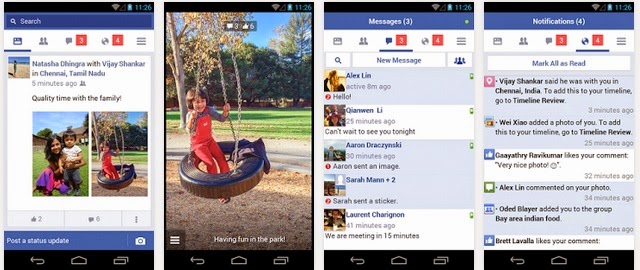
Anyone who did not had access to the current release Facebook Lite can grab it here.
Highlights:
This version of Facebook uses less data and works in all network conditions.
Facebook Lite is:
- Fast to install — the app is less than 1 MB
- Quick to load
- Efficient with data
- Designed for 2G networks and areas with limited network connectivity
Keeping up with friends is faster than ever. Facebook is free and always will be.
About Facebook:
- Message friends and have group conversations
- Get notifications when friends like and comment on your posts
- See what friends are up to
- Share updates and photos
Download Facebook Lite here
Vivaldi - new browser from Opera developer
Nowadays, we have Chrome, Firefox, Internet Explorer, Opera and next coming soon Microsoft new Browser so called 'Project Spartan'. Out of no where, there is Vivaldi browser for desktop which derived from Opera browser. It is said to be a browser for our friends. A browser that is fast, but also a browser that is rich in functionality, highly flexible and puts the user first.
Currently, it is still a Technical preview. Whoever interested to test it and help the team to give some valuable feedback, please do so by visiting their website here:
https://vivaldi.com
Facebook Lite use less data and resource for low end phones
This is what most people want. It use less data. It also run smooth where it use less resources which meant for low-end phones.
The main target users mention by Facebook CEO Mark Zuckerberg is developing areas where has restricted internet access. This is also good for others that need this approach to come as an alternative for their daily needs. The requirements is as low as Android 2.2, making it an option for most users.
Download it here: https://play.google.com/store/apps/details?id=com.facebook.lite
The main target users mention by Facebook CEO Mark Zuckerberg is developing areas where has restricted internet access. This is also good for others that need this approach to come as an alternative for their daily needs. The requirements is as low as Android 2.2, making it an option for most users.
Download it here: https://play.google.com/store/apps/details?id=com.facebook.lite
Sunday, January 18, 2015
BleachBit (Cruft Cleaner) - a CCleaner for Ubuntu
Windows users will be familiar with applications like CCleaner, which scan for and clean out junk files, empty folders, bloated caches, and obsolete packages. For a a similarly quick and effortless click n’ clean solution on Ubuntu try BleachBit.
It is a powerful tool, so do pay attention to what you’re cleaning. Don’t aimlessly check every box; not everything that it can clean needs to be. Play it smart; when in doubt, leave it out.
Install now: https://apps.ubuntu.com/cat/applications/bleachbit/
It is a powerful tool, so do pay attention to what you’re cleaning. Don’t aimlessly check every box; not everything that it can clean needs to be. Play it smart; when in doubt, leave it out.
Install now: https://apps.ubuntu.com/cat/applications/bleachbit/
Saturday, January 17, 2015
Launch Windows Admin Tools from the Command Line
You can access admin tools in Windows consoles instead of from the Start menu. But you can also open these console from the command line if you know their .msc filenames. This can be especially useful if you log on to your admin workstation using a limited privilege account and use Runas command to perform admin tasks.
First we need to execute windows cmd, this is the shorcuts:
For normal prompt, follow these steps:
------------------------------------------------------------------------
WinKey+R
Input "cmd".
Enter
.
For elevated (administrator) prompt, follow these steps:
WinKey (Start Menu opens on the left-bottom corner)
Input "cmd".
Ctrl+Shift+Enter
------------------------------------------------------------------------
For reference, here's a list of admin tools with their associated .msc files. You can print this out and tape it on the wall beside your workstation until you memorize the ones you use most commonly.
AD Domains and Trusts
domain.msc
Active Directory Management
admgmt.msc
AD Sites and Serrvices
dssite.msc
AD Users and COmputers
dsa.msc
ADSI Edit
adsiedit.msc
Authorization manager
azman.msc
Certification Authority Management
certsrv.msc
Certificate Templates
certtmpl.msc
Cluster Administrator
cluadmin.exe
Computer Management
compmgmt.msc
Component Services
comexp.msc
Configure Your Server
cys.exe
Device Manager
devmgmt.msc
DHCP Managment
dhcpmgmt.msc
Disk Defragmenter
dfrg.msc
Disk Manager
diskmgmt.msc
Distributed File System
dfsgui.msc
DNS Managment
dnsmgmt.msc
Event Viewer
eventvwr.msc
Indexing Service Management
ciadv.msc
IP Address Manage
ipaddrmgmt.msc
Licensing Manager
llsmgr.exe
Local Certificates Management
certmgr.msc
Local Group Policy Editor
gpedit.msc
Local Security Settings Manager
secpol.msc
Local Users and Groups Manager
lusrmgr.msc
Network Load balancing
nlbmgr.exe
Performance Montior
perfmon.msc
PKI Viewer
pkiview.msc
Public Key Managment
pkmgmt.msc
QoS Control Management
acssnap.msc
Remote Desktops
tsmmc.msc
Remote Storage Administration
rsadmin.msc
Removable Storage
ntmsmgr.msc
Removalbe Storage Operator Requests
ntmsoprq.msc
Routing and Remote Access Manager
rrasmgmt.msc
Resultant Set of Policy
rsop.msc
Schema management
schmmgmt.msc
Services Management
services.msc
Shared Folders
fsmgmt.msc
SID Security Migration
sidwalk.msc
Telephony Management
tapimgmt.msc
Terminal Server Configuration
tscc.msc
Terminal Server Licensing
licmgr.exe
Terminal Server Manager
tsadmin.exe
UDDI Services Managment
uddi.msc
Windows Mangement Instumentation
wmimgmt.msc
WINS Server manager
winsmgmt.msc
First we need to execute windows cmd, this is the shorcuts:
For normal prompt, follow these steps:
------------------------------------------------------------------------
WinKey+R
Input "cmd".
Enter
.
For elevated (administrator) prompt, follow these steps:
WinKey (Start Menu opens on the left-bottom corner)
Input "cmd".
Ctrl+Shift+Enter
------------------------------------------------------------------------
For reference, here's a list of admin tools with their associated .msc files. You can print this out and tape it on the wall beside your workstation until you memorize the ones you use most commonly.
AD Domains and Trusts
domain.msc
Active Directory Management
admgmt.msc
AD Sites and Serrvices
dssite.msc
AD Users and COmputers
dsa.msc
ADSI Edit
adsiedit.msc
Authorization manager
azman.msc
Certification Authority Management
certsrv.msc
Certificate Templates
certtmpl.msc
Cluster Administrator
cluadmin.exe
Computer Management
compmgmt.msc
Component Services
comexp.msc
Configure Your Server
cys.exe
Device Manager
devmgmt.msc
DHCP Managment
dhcpmgmt.msc
Disk Defragmenter
dfrg.msc
Disk Manager
diskmgmt.msc
Distributed File System
dfsgui.msc
DNS Managment
dnsmgmt.msc
Event Viewer
eventvwr.msc
Indexing Service Management
ciadv.msc
IP Address Manage
ipaddrmgmt.msc
Licensing Manager
llsmgr.exe
Local Certificates Management
certmgr.msc
Local Group Policy Editor
gpedit.msc
Local Security Settings Manager
secpol.msc
Local Users and Groups Manager
lusrmgr.msc
Network Load balancing
nlbmgr.exe
Performance Montior
perfmon.msc
PKI Viewer
pkiview.msc
Public Key Managment
pkmgmt.msc
QoS Control Management
acssnap.msc
Remote Desktops
tsmmc.msc
Remote Storage Administration
rsadmin.msc
Removable Storage
ntmsmgr.msc
Removalbe Storage Operator Requests
ntmsoprq.msc
Routing and Remote Access Manager
rrasmgmt.msc
Resultant Set of Policy
rsop.msc
Schema management
schmmgmt.msc
Services Management
services.msc
Shared Folders
fsmgmt.msc
SID Security Migration
sidwalk.msc
Telephony Management
tapimgmt.msc
Terminal Server Configuration
tscc.msc
Terminal Server Licensing
licmgr.exe
Terminal Server Manager
tsadmin.exe
UDDI Services Managment
uddi.msc
Windows Mangement Instumentation
wmimgmt.msc
WINS Server manager
winsmgmt.msc
Tutorial Enable USB Port through Regedit in Windows if it is blocked
1. Click Start, and then click Run.
2. In the Open box, type regedit, and then click OK.
3. Locate, and then click the following registry key:
HKEY_LOCAL_MACHINE\SYSTEM\CurrentControlSet\Services\UsbStor
4. In the right pane, double-click "Start".
5. In the Value data box, type "3" (without quotes), click Hexadecimal (if it is not already selected), and then click OK. Note :- if 3 is entered it will open the port and if 4 is entered it will close the port.
6. Quit Registry Editor.
Subscribe to:
Posts (Atom)